
Distilled means fewer inference steps
BFL's distilled 4B and 9B models are trained for short-step inference and rapid interaction. They are the variants connected to this browser workspace.
Model Family
Generate and edit with the compact FLUX.2 Klein family, tuned for rapid iteration and high-volume creative work. Choose 4B for the lightest rapid pass or 9B for a stronger quality-speed balance.
Choose 4B for the lightest, fastest workflow or 9B for a stronger quality-speed balance.
FLUX.2 Klein 4B uses 1 credit per image.

Generated Image will appear here
FLUX.2 Klein is Black Forest Labs' compact branch for interactive image generation and editing. This dedicated page keeps the speed-oriented 4B and quality-oriented 9B choices together, while the production Pro, Max, and Flex variants stay on FLUX.2.
Text promptNew image
Reference image + instructionUpdated image
Current workspace: hosted inference through Replicate, one reference image, and a fixed 1MP result. Generation time depends on provider queues and runtime, so BFL's hardware benchmarks are educational context rather than a site-speed promise.
BFL built Klein as a smaller FLUX.2 family for short-step generation, fast feedback, local deployment, and customization. The official family includes distilled and Base checkpoints. KontextAI exposes the two distilled hosted variants because they fit direct generation and editing; Base and LoRA workflows belong to training and local toolchains.
60-second summary
BFL's distilled 4B and 9B models are trained for short-step inference and rapid interaction. They are the variants connected to this browser workspace.
Base checkpoints preserve a broader optimization and fine-tuning role. They are useful for researchers, LoRA authors, and local pipelines, yet they are absent from this selector.
BFL publishes sub-second results on specific high-end hardware. Hosted Replicate calls also include queue, upload, and runtime conditions, so this product promises a rapid-iteration model choice without a fixed latency.
BFL releases 4B weights under Apache 2.0 and 9B weights under the FLUX Non-Commercial License. Hosted use follows its own provider and product terms.
Open the first-party sources for provider-specific limits, model history, local deployment, and licensing details.
Official examples
BFL's official Klein gallery spans style changes, readable editorial text, broad generation, and multi-step edits. Individual gallery prompts are not published, so these captions describe only what is visible.
 Before
 After
AfterThe zebra stays in the same field and pose while rounded black-and-white forms become dense multicolor candy-like forms.

The official editorial portrait preserves natural light and skin texture while rendering the cap lettering as a central visual detail.
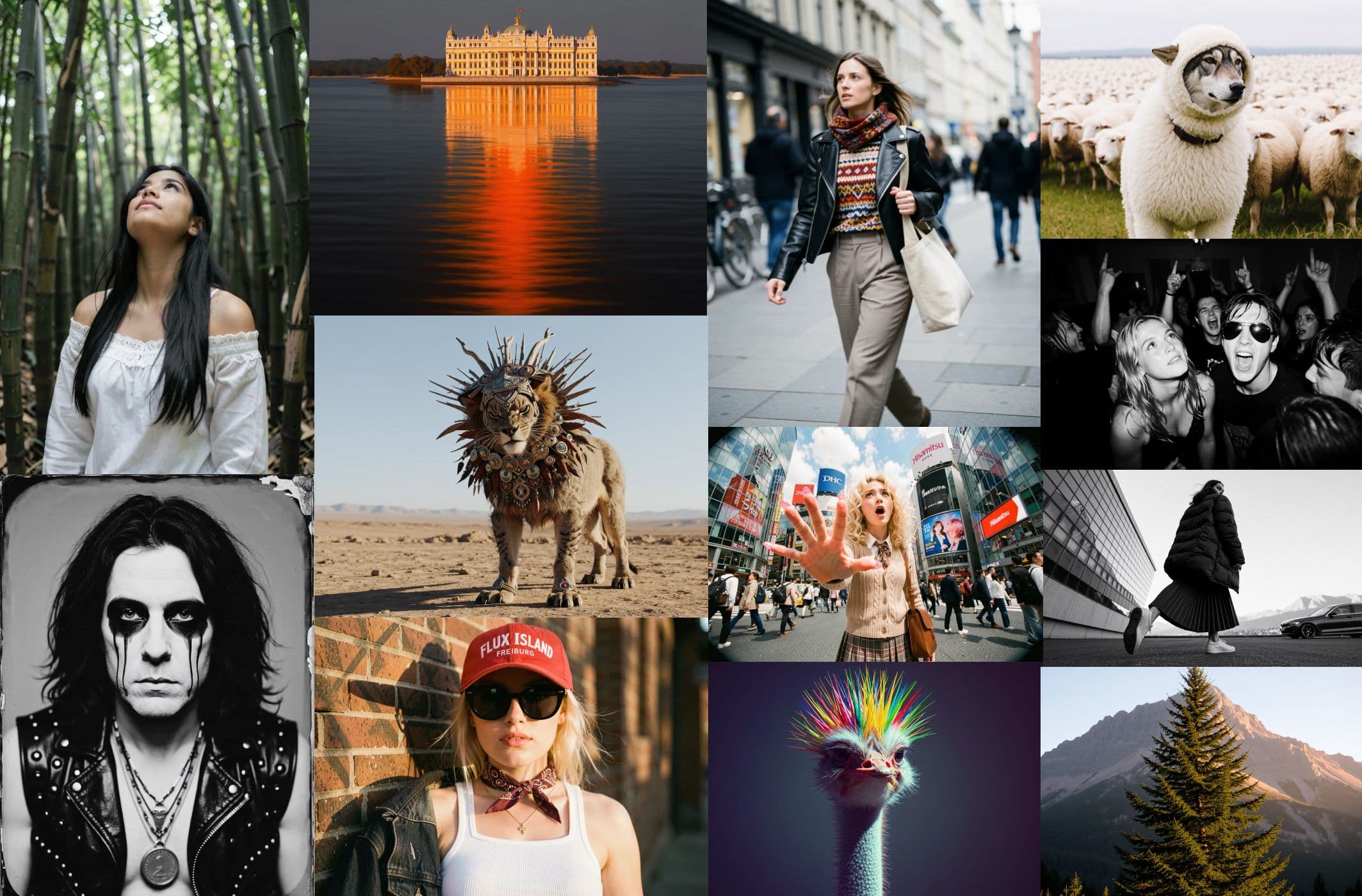
BFL's official collage shows that Klein's compact positioning still covers several visual genres and art directions.
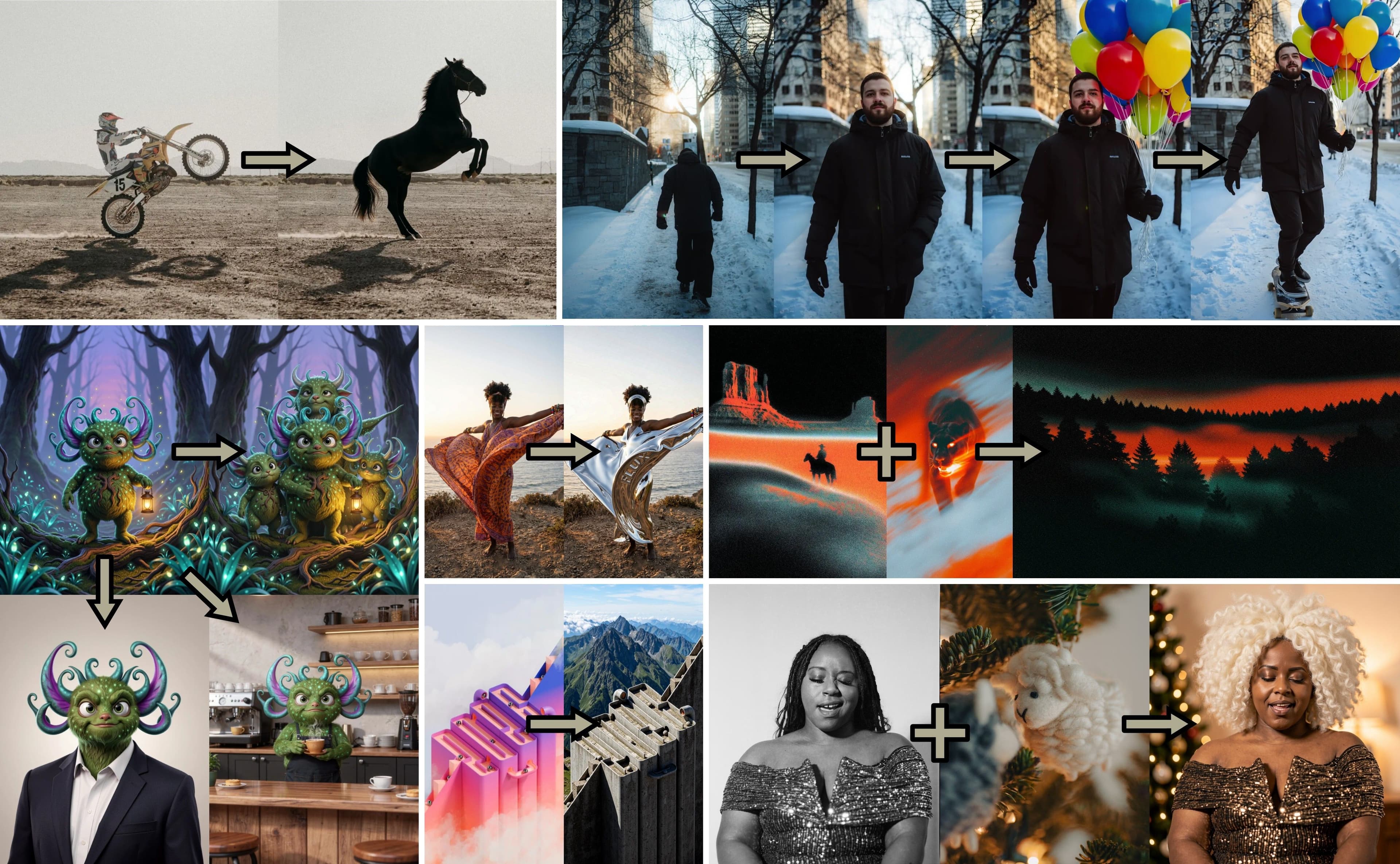
The official editing collage shows object transformation, consistent subjects, and effect changes across several example sequences.
Images are a small attributed editorial selection from the official BFL FLUX.2 Klein page.
Core capabilities
Klein's value is the feedback loop: create, inspect, change the prompt or reference, and run another deliberate pass.
Explore more directions before choosing a final composition, visual style, or production variant.
Start from text, then move into a reference-guided change without leaving the Klein family.
BFL also publishes weights and Base checkpoints for local deployment and fine-tuning outside this hosted workspace.
How it works
Choose the job, choose the compact model size, and write the detail Klein will not add through prompt upsampling.
Create from a prompt, or upload one image when a subject, layout, or visual identity should carry forward.
Use 4B for the speed-first pass and 9B when the Klein workflow needs stronger detail and adherence.
Download a useful result or change one part of the brief before running the next quick cycle.
Use cases
Klein fits work where seeing the next option quickly matters more than choosing the heaviest production tier first.
Compare several compositions, moods, and visual metaphors before investing in a final direction.
Prompt structure
“Editorial concept thumbnail: a tiny greenhouse glowing inside a dark server room, wide composition, dramatic scale contrast, cool cinematic light.”
Try color systems, object treatments, materials, and graphic styles during a review or ideation session.
Prompt structure
“Turn the chair into translucent orange resin; keep the room, camera position, shadows, and surrounding furniture unchanged.”
Build broad mood-board material for social concepts, product campaigns, story scenes, or pitch decks.
Prompt structure
“Minimal fragrance campaign, cobalt glass bottle on wet volcanic rock, sea mist, early-morning light, premium editorial photography.”
Make one focused change, inspect what moved, then protect more of the source in the next instruction.
Prompt structure
“Change only the jacket to matte silver nylon; preserve the face, hair, pose, hands, background, and camera framing.”
Choose a variant
Both variants cost one KontextAI credit in this workspace. The choice is about how light the first pass should be and how much detail the Klein result needs.
FLUX.2 Klein
The compact, speed-first distilled model for rapid drafts, high-volume ideation, and accessible local workflows.
1 credit per image
FLUX.2 Klein
The larger distilled model for stronger detail and a better quality-speed balance within Klein.
1 credit per image
Prompt guide
BFL says Klein does not use prompt upsampling. Write a direct narrative brief with subject, setting, lighting, composition, style, and edit-preservation instructions where relevant.
Start with the person, object, product, or scene and state what should happen to it.
Describe the environment, time of day, weather, and contextual objects that make the scene understandable.
Add framing, camera angle, focal feeling, light direction, contrast, and color temperature.
Name the medium, material, photography style, rendering treatment, texture, or palette you want.
State the identity, pose, composition, geometry, colors, or background elements that must stay unchanged.
FAQ
The practical details to know before selecting a model or spending a credit.
FLUX.2 Klein is BFL's compact model family for rapid image generation and editing. It includes 4B and 9B distilled models for short-step inference plus Base checkpoints aimed at training and customization.
Klein carries a different user decision: compact speed, 4B versus 9B, local weights, Base checkpoints, and rapid iteration. Pro, Max, and Flex stay together on the production FLUX.2 page.
Start with 4B for the lightest speed-first pass. Choose 9B when stronger image detail and prompt adherence matter more while staying inside the Klein workflow. Both cost one credit here.
No fixed latency is promised. BFL's benchmarks use named hardware and measure model inference. KontextAI uses hosted Replicate calls that also include upload, queue, and runtime conditions.
Base checkpoints are training-oriented starting points with more room for fine-tuning. LoRA is a smaller customization layer trained on top of a compatible model. This page exposes only the distilled hosted 4B and 9B variants.
Generate accepts a text prompt. Edit accepts one reference image. Both return a fixed 1MP result in WebP, JPG, or PNG. The underlying Replicate Klein schemas support a broader range, yet those controls are not exposed here today.
BFL's 4B and 9B weight licenses apply to local model use: 4B is Apache 2.0 and 9B uses FLUX NCL. Hosted generation also follows KontextAI and provider terms, and uploaded references must be yours to use.
Start with 4B, move to 9B when the draft needs more detail, and keep the next prompt focused on one visible improvement.